Obsolete media; the Sony PCM1600; encoding data onto QR codes
A while ago I recovered some data from floppy discs.
I was looking for something recently (I had to fill out a tax return) and found the disks in my cupboard. This sent me down a bit of a rabbit hole of obsolete media, and thinking about how we archive data for the future. (And how I still must still do my tax return, but this is more interesting).
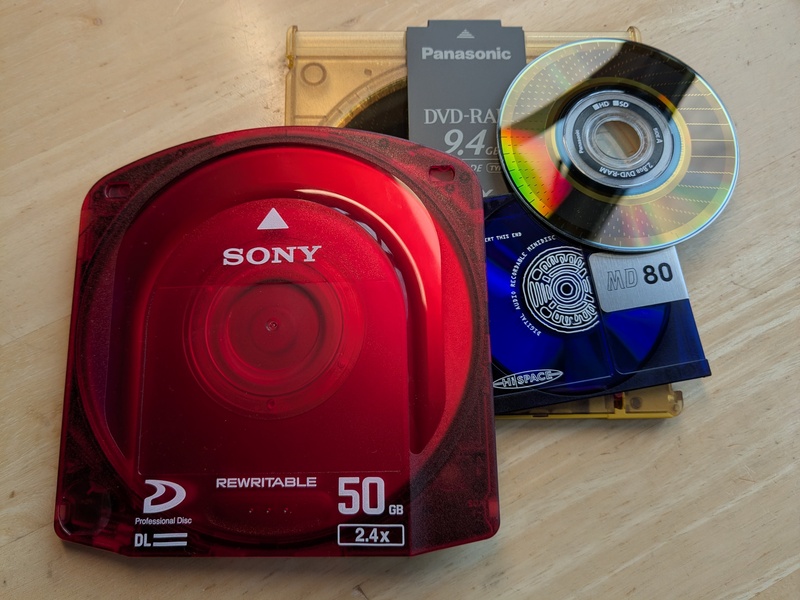 Photo: Obsolete media is much more colourful than the boring cloud. (Professional disc, MiniDisc and DVD-RAM). I miss the tactility of this - the clunk as it went into a drive, and the whirring and clunking sounds as data was written and read.
Sony PCM-1600 - Storing digital audio on video
While in my tax-return-avoiding rabbit hole I learned about the Sony PCM1600. Recording music digitally is easy nowadays, but in the 1970s there were no media that had the bandwidth to store the high (at the time) data rates needed to store digital music.
A clever solution was to use the broadcast video tape format of the day - U-matic to store digital audio on video tapes. Technology connections and video99 have interesting YouTube videos showing how it works. Of course, now we just store it on a tiny microSD card and wonder what all the fuss was about back then.
Apparently, Dire Straits "Brothers in arms" and Madonna's "Like a Virgin" albums all existed on video tape at one time. I never knew.
My stupid idea
Faced with the prospect of finally having to fill out my tax return, my brain had one of its random stupid thoughts: "What would a PCM1600 look like today? Could we share data on YouTube!"
I thought this would be interesting to try. I thought "What if I took a file, split it into chunks, made a QR-code for each, and combined them into a video?". I quickly vibe-coded two scripts:
- encode-file-to-mp4 takes a file and outputs a video file
- decode-mp4-to-file reverses this - give it a video and it will (or at least should!) give you the original file back.
As this was a very very quick attempt I encoded 1k of data per video frame, and used 2 frames per second in the hope this would get through video compression. I'm sure it could be made far more efficient.
Trying with YouTube
The scripts worked - I took a 200k image file and turned it into a 12Mbyte video. Efficient! Even better, I could turn my video file back into my original image.
I uploaded the file to YouTube and … nothing! The video did not appear in my feed! Had I brought down YouTube, by crashing their AI video summary generator? Who knows. But I don't really think this project is worthy of the time to investigate.
Is this actually useful?
The idea of taking a file and encoding it onto QR codes feels like it might be interesting.
- qr-backup is an interesting project. It takes a file, encodes it using erasure codes (this makes the file recoverable even if a certain number of codes aren't readable), encrypts it, and prints it to paper. You scan the paper in, and hopefully get your original data back.
- Maybe such data could be carved onto stone, or microfilm for long term storage.
- Maybe you could have a treasure hunt game - you have to run around, find all the QR codes which are printed and hidden somewhere. Once you find them all you get the dubious reward of a reconstructed image, or something.
- Or maybe you could store an encryption key, split and hidden in many different places.
Who knows….
Update: Since publishing this blog post I've been informed that the French radioactive waste management agency is doing something similar to preserve information about nuclear waste repositories: PDF Hybrid Preservation on Paper "Combining Digital and Analog to Preserve Critical Documents for Centuries in a Radioactive Waste Management Context" - iPRES 2024 International Conference on Digital Preservation
Anyway. I still have a tax return to fill out: Let's see what other distractions I can find. Maybe I'll make myself a nice tax jacket from receipts, like Bernard in Black Books.
The scripts
Here are the scripts I used:
(You need the following tools installed. I used these with MacOS)
- qrencode to encode the QRcode
- zbar to decode the QRcode
- ffmpeg to make, and decode the video
brew install zbar qrencode ffmpeg
The first encodes a file:
#!/usr/bin/env bash
set -euo pipefail

if [ $# -lt 2 ]; then
    echo "Usage: $0 <input_file> <output_video>"
    exit 1
fi

INPUT="$1"
VIDEO="$2"

CHUNK_SIZE="1k"

rm -rf chunks qrs
mkdir -p chunks qrs

echo "[*] Splitting file into chunks..."
split -b "$CHUNK_SIZE" "$INPUT" chunks/chunk_

echo "[*] Encoding chunks as base64 and generating QR images..."
for f in chunks/chunk_*; do
    name=$(basename "$f")
    base64 < "$f" | qrencode -o "qrs/${name}.png"
done

echo "[*] Creating video from QR frames..."
ffmpeg -framerate 2 -pattern_type glob -i 'qrs/*.png' \
    -vf "scale=720:720:force_original_aspect_ratio=decrease" \
    -c:v libx264 -pix_fmt yuv420p "$VIDEO" \
    -hide_banner -loglevel error

echo "Encoding done: Output video: $VIDEO"
And the decoder…
#!/usr/bin/env bash
set -euo pipefail

if [ $# -lt 2 ]; then
    echo "Usage: $0 <input_video> <output_file>"
    exit 1
fi

VIDEO="$1"
OUTPUT="$2"

rm -rf frames b64
mkdir -p frames b64

echo "[*] Extracting frames..."
ffmpeg -i "$VIDEO" -vsync 0 frames/frame_%06d.png \
    -hide_banner -loglevel error

echo "[*] Decoding QR codes to base64..."
for img in frames/*.png; do
    base=$(basename "$img" .png)
    zbarimg --raw "$img" > "b64/${base}.txt" 2>/dev/null || {
        echo "WARNING: Could not decode: $img"
    }
done

echo "[*] Reassembling and decoding base64 to binary..."
ls b64 | sort -V | while read f; do
    cat "b64/$f"
done | base64 -d > "$OUTPUT"

echo "Decoding done: Reconstructed file: $OUTPUT"